Roles And Permissions
Shared access model
Builder Insights uses one shared role model across the mobile app and the admin control plane. If permissions drift between surfaces, user trust and operational safety drift with them.
Core permission principle
- higher roles inherit lower-role capabilities
- mobile and admin should tell the same access story
- role-gated behavior should be tested intentionally, not assumed
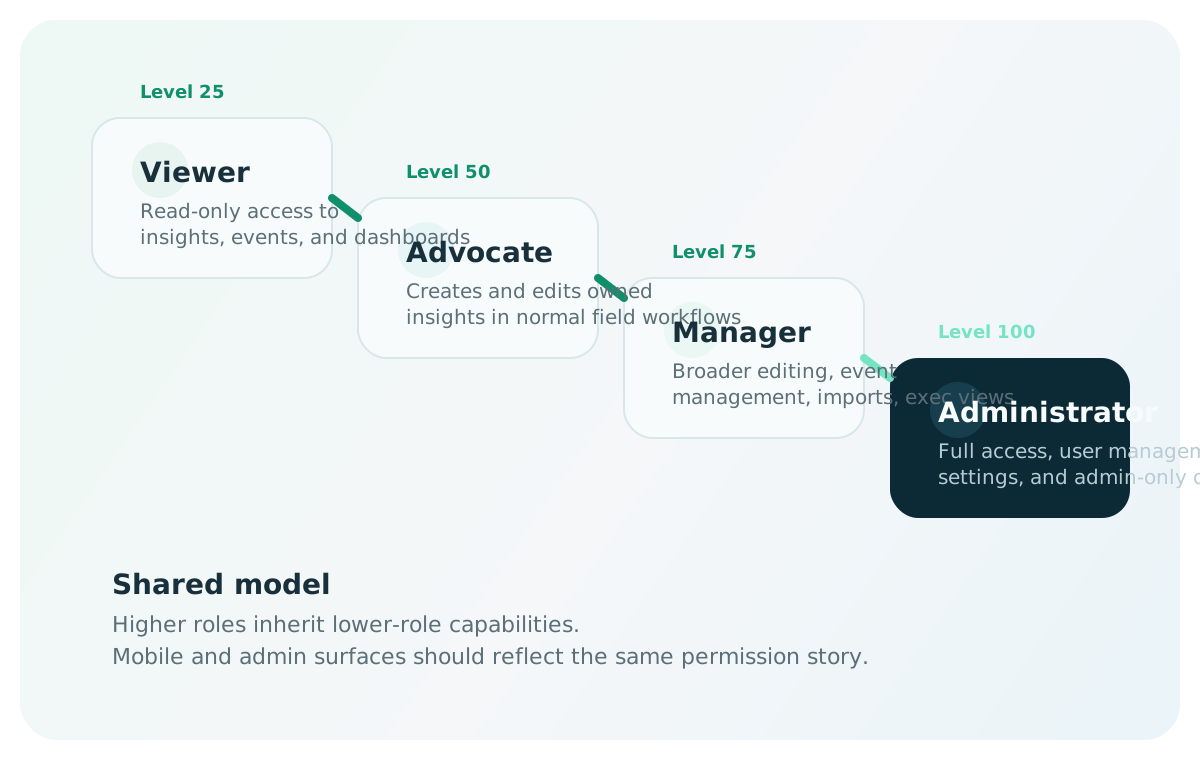
Role ladder
One hierarchy, two product surfaces
The role system scales from read-only visibility to full administrative control. The important product rule is not just who can see a screen, but whether the same role semantics hold everywhere.
- viewer is read-only across the system
- advocate is the standard contribution role
- manager expands into coordination, imports, and executive visibility
- administrator governs the system and access-sensitive operations
Role hierarchy
| Role | Level | Summary |
|---|---|---|
| Administrator | 100 | Full access, including user management, settings, and admin-only operations |
| Manager | 75 | Team-level access, broader editing, event management, imports, and executive visibility |
| Advocate | 50 | Standard capture and contribution role |
| Viewer | 25 | Read-only access to system data |
The hierarchy is defined in src/lib/roles.ts. Permission checks use a >= comparison — a manager automatically inherits advocate and viewer capabilities.
What each role means
The system treats this role as read-only in both products.
- Can view insights, events, advocates, bugs, leaderboard, world map
- Can view analytics dashboards
- Can view settings (read-only)
- Cannot create, edit, or delete any data
- Cannot access event creation/edit forms
The standard field contribution role for mobile capture and admin editing workflows.
- Can create insights, events, sessions, bugs
- Can edit and delete their own insights (ownership enforced by
advocateIdmatch) - Can annotate and upvote any insight
- Can participate in normal capture workflows
- Can view all team data
- Cannot manage advocates, users, imports, or settings mutations
Expands from contribution into broader coordination, program management, and analysis.
- Can edit and delete any insight (no ownership restriction)
- Can manage events (full CRUD including bulk upsert/import)
- Can create and edit advocates
- Can edit the Program plan and post program comments
- Can send Slack digests and manage schema aliases
- Can access the PMO Import page
- Cannot access admin-only pages (Operations, Monitoring, User Management)
Governs the system itself — not just content inside it.
- All manager permissions
- Can access User Management (
/admin/users) - Can access Operations (
/operations) — backup, DB stats - Can access Monitoring (
/monitoring) — app observability - Full access to all settings and API endpoints
Enforcement layers
Access control is enforced at three layers. All three must agree for the system to be secure.
Layer 1: Middleware (src/middleware.ts)
The Next.js middleware intercepts every request and applies path-based rules before the route handler runs.
Fully public (no auth required):
| Path | Notes |
|---|---|
/api/auth/* | Authentication flow (magic-link, verify-code, logout) |
/api/health | Health check |
Public GET, authenticated mutations:
These paths allow unauthenticated GET requests (used by the mobile app for read access). POST, PUT, PATCH, and DELETE require a valid JWT.
| Path | Mutation role requirement |
|---|---|
/api/insights, /api/events, /api/sessions, /api/bugs, /api/attachments, /api/analytics, /api/stats | advocate or above |
/api/advocates, /api/slack, /api/program, /api/schema | manager or above |
/api/cron | Cron routes handle their own auth via CRON_SECRET |
Admin-only paths (all methods):
| Path | Required role |
|---|---|
/admin/*, /api/admin/* | admin |
/operations, /api/operations/* | admin |
/monitoring | admin |
Manager-only paths (all methods):
| Path | Required role |
|---|---|
/import | manager |
/api/events/upsert | manager |
Viewer-blocked page paths:
| Path | Required role | Notes |
|---|---|---|
/events/new | advocate | Viewers redirected to dashboard |
/events/[id]/edit | advocate | Viewers redirected to dashboard |
Layer 2: API route handlers (defense-in-depth)
Some routes add their own role checks inside the handler. This is defense-in-depth — if middleware is bypassed or misconfigured, the route still enforces access.
| Route | Internal check | Required role |
|---|---|---|
api/admin/users (GET, POST, PUT) | requireAdmin() | admin |
api/admin/users/[id] (GET, PUT, DELETE) | requireAdmin() | admin |
api/operations/backup (GET) | sessionUser?.isAdmin | admin |
api/operations/stats (GET) | sessionUser?.isAdmin | admin |
api/advocates (POST) | session.role check | manager+ |
api/program (POST, DELETE) | canUpdateProgram(role) | manager+ |
api/program/comments (POST) | canUpdateProgram(role) | manager+ |
api/insights/[id] (PUT) | ownership check via advocateId | own insights (advocate), any (manager+) |
api/insights/[id] (DELETE) | ownership check via advocateId | own insights (advocate), any (manager+) |
Layer 3: UI-level gating
The admin app's navigation and page components conditionally show or disable features based on the user's role (fetched from /api/auth/me).
Navigation sidebar (src/components/AdminLayout.tsx):
| Item | Visibility rule |
|---|---|
| Dashboard, Search, Events, Insights, Advocates, Leaderboard, World Map, Bug Reports, Settings | All authenticated users |
| Program | minRole: 'manager' — hidden for advocate and viewer |
| PMO Import | minRole: 'manager' — hidden for advocate and viewer |
| Monitoring | adminOnly: true — hidden for non-admins |
| Operations | adminOnly: true — hidden for non-admins |
| User Management | adminOnly: true — hidden for non-admins |
Page-level behavior:
| Page | Role check | Behavior for insufficient role |
|---|---|---|
/insights | canModify (advocate+) | Edit, delete, and create buttons hidden for viewers |
/advocates | canModify (admin or manager) | Edit/delete hidden for advocate and viewer |
/program | canEdit (admin or manager) | Read-only alert shown; all form inputs disabled |
/settings | isManager (manager+) | Slack digest button disabled; schema delete buttons hidden |
/operations | isAdmin check | Blank page rendered for non-admins |
/monitoring | isAdmin check | "Admin access required" alert for non-admins |
Full access matrix
The definitive reference for what each role can do across the entire system.
Data operations
| Capability | Viewer | Advocate | Manager | Admin |
|---|---|---|---|---|
| View insights, events, advocates, sessions, bugs | Yes | Yes | Yes | Yes |
| View dashboards and analytics | Yes | Yes | Yes | Yes |
| View search, leaderboard, world map | Yes | Yes | Yes | Yes |
| Create insights | — | Yes | Yes | Yes |
| Edit own insights | — | Yes | Yes | Yes |
| Edit any insight | — | — | Yes | Yes |
| Delete own insights | — | Yes | Yes | Yes |
| Delete any insight | — | — | Yes | Yes |
| Create/edit events | — | Yes | Yes | Yes |
| Create/edit sessions | — | Yes | Yes | Yes |
| Create/edit bugs | — | Yes | Yes | Yes |
| Annotate or upvote insights | — | Yes | Yes | Yes |
Management operations
| Capability | Viewer | Advocate | Manager | Admin |
|---|---|---|---|---|
| Create/edit advocates | — | — | Yes | Yes |
| Edit Program plan | — | — | Yes | Yes |
| Post program comments | — | — | Yes | Yes |
| Import data (PMO Import) | — | — | Yes | Yes |
| Bulk upsert events | — | — | Yes | Yes |
| Send Slack digest | — | — | Yes | Yes |
| Share insight to Slack | — | — | Yes | Yes |
| Modify schema aliases | — | — | Yes | Yes |
Administrative operations
| Capability | Viewer | Advocate | Manager | Admin |
|---|---|---|---|---|
| User management | — | — | — | Yes |
| Operations (backup, DB stats) | — | — | — | Yes |
| Monitoring dashboard | — | — | — | Yes |
Authentication flow
Builder Insights uses passwordless magic-link authentication.
- User enters email at
/login - Server sends a 6-digit verification code (and a magic-link URL) to the email
- User enters the code or clicks the link
- Server looks up the email in the
advocatescollection to determine role - A JWT is created with
{ email, name, role, isAdmin, advocateId }and stored as an httpOnly cookie (di-session) - The JWT expires after 7 days
Token sources: The middleware accepts JWTs from either:
- Cookie (
di-session) — used by the web admin app Authorization: Bearerheader — used by the mobile app
Auto-provisioning: If a user signs in with an email that does not match any advocate record, the system auto-creates a viewer-level advocate record.
The isAdmin flag
The JWT contains both a role field and a legacy isAdmin boolean. These can theoretically diverge (e.g., a record with role: 'manager' but isAdmin: true). The system normalizes this:
- The
/api/auth/meendpoint promotesroleto'admin'ifisAdministrue - The middleware checks both:
user.role !== 'admin' && !user.isAdmin - UI code reads from
/api/auth/meand always sees a consistentrole+isAdminpair
Decision
isAdmin normalization
The canonical source of truth for admin status is: role === 'admin' || isAdmin === true. The /api/auth/me endpoint normalizes these into a single consistent response so all UI components can rely on the role field alone.
Surface implications
Role visibility on mobile reinforces a simple and trustworthy field workflow.
Executivetab visible only for manager and admin- Standard field capture intended for advocate-and-above roles
- Profile reflects the active user role clearly
The admin side enforces higher-risk operations with stronger gating at all three layers.
/operations,/admin, and/monitoringrequire admin access (middleware + page-level)- Manager-level paths such as import require at least manager (middleware)
- Viewers see the settings page but cannot mutate schema or send Slack digests
- Advocates can edit/delete only their own insights (API-level ownership check)
Risk
Where permission drift becomes dangerous
- a screen is visible but the action should not be
- an API allows mutation that the UI appears to forbid
- a role sees executive or admin-only views in one surface but not the other
- testers assume a gate is correct because the demo account does not expose the edge case
Test accounts
The system provides built-in test accounts for verifying role-specific behavior:
| Role | Purpose | |
|---|---|---|
demo@builderinsights.app | advocate | General behavior testing |
admin@builderinsights.app | admin | Admin feature testing |
manager@builderinsights.app | manager | Manager workflow testing |
advocate@builderinsights.app | advocate | Advocate permission testing |
viewer@builderinsights.app | viewer | Read-only access testing |
These accounts bypass the email verification step — any 6-digit code is accepted.
Practical testing guidance
If role-specific accounts are not available:
- test with the demo account for general behavior
- note role-gated paths as not verified
- do not assume visibility or access rules are correct without the proper role
QA check
Best way to validate permissions
Test both view access and mutation access. A page loading correctly is not enough if the wrong role can still modify data, reach restricted routes, or see executive-only signals. For each role, verify: (1) correct navigation items visible, (2) correct pages accessible via direct URL, (3) correct API responses for mutations.