Strategic Overview
Why Builder Insights exists
Builder Insights is a field-intelligence system for turning conversations, event feedback, and in-market observations into structured insight that product teams, operators, and leadership can actually use.
Strategic promise
- capture signal while it is still fresh
- preserve trust in low-connectivity field conditions
- turn raw observations into shared visibility and action
Leadership problem statement
Important feedback fragments across notes, chat threads, memory, spreadsheets, and follow-up conversations.
Without structured capture, recurring problems and opportunities are hard to spot before they become costly.
Product and field teams spend too much time turning raw anecdotes into something decision-makers can use.
Leadership views become delayed, inconsistent, and dependent on ad hoc rollups instead of shared system truth.
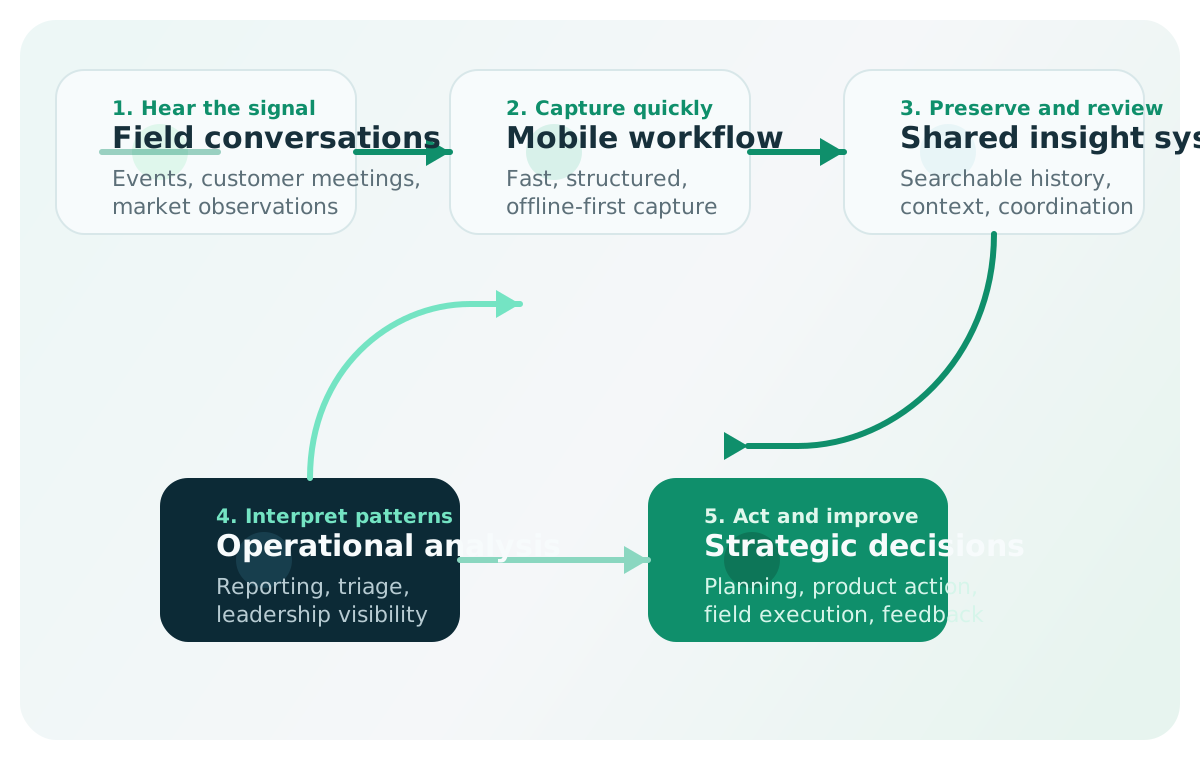
Strategic operating loop
The platform turns field signal into a repeatable decision system
Builder Insights is not just a note-taking app. It is a product system that helps teams hear signal in the field, structure it quickly, preserve it safely, and convert it into action.
- field teams need fast capture, not administrative drag
- operators need shared context, visibility, and repeatable review
- leadership needs patterns, summaries, and trustworthy reporting
Platform at a glance
What the platform includes
The frontline capture surface for Builder Relations advocates and field teams during events, meetings, and travel.
- capture text and voice-based insights quickly
- attach event, session, sentiment, product area, and priority context
- save offline first and sync later without breaking trust
The analytical and operational control plane where teams review what is being captured and act on it.
- manage events and shared operating context
- review, search, and enrich captured insights
- support reporting, imports, exports, and leadership visibility
The shared memory for architecture, workflows, QA, releases, screenshots, and demo readiness.
- reduce institutional knowledge loss across teams
- support onboarding and cross-functional alignment
- make the platform sustainable as it grows
Strategic feedback loop
Builder Relations teams sit close to real customer and builder behavior, which makes them a rich source of product and market signal.
The system reduces friction between hearing something important and getting it into a usable shared record.
Context, metadata, and offline-safe storage make insights comparable instead of remaining isolated anecdotes.
The admin and reporting layer help operators and leaders spot recurring themes, trends, and outliers faster.
The platform exists to influence product decisions, field execution, planning, and leadership visibility.
Why this matters strategically
| Capability | Strategic value |
|---|---|
| Faster insight capture | reduces the gap between hearing something important and preserving it in a usable system |
| Better data quality | structured metadata makes feedback more actionable than freeform notes alone |
| Offline-first reliability | protects trust in real-world field conditions where connectivity is inconsistent |
| Shared visibility | gives managers and leadership access to field signal without waiting for manual rollups |
| More consistent reporting | creates a stronger base for summaries, event analysis, thematic review, and executive storytelling |
| Lower operational loss | reduces the chance that valuable signal disappears before someone can act on it |
Implementation philosophy
If capture is slow, confusing, or fragile, adoption will fall and data quality will degrade.
Offline-first capture, sync safety, and low-friction recovery are essential because users must believe their work is safe.
Reporting should make patterns more obvious, not demand heavy manual interpretation every time.
Screenshots, release discipline, tester guidance, and architecture docs are part of platform quality, not overhead.
Branding, domains, data contracts, and workflows should change deliberately so active usage is not disrupted.
Strategic implementation process
Focus first on making mobile capture fast, reliable, and worth using during real field work.
- make mobile capture fast and reliable
- validate offline-first behavior
- prove that teams will actually use the workflow in the field
Focus on making captured data visible centrally and useful to operators and leaders.
- make captured data visible centrally
- allow filtering, search, and trend review
- support operational and leadership reporting
Build the runbooks, quality discipline, and shared memory that make the product repeatable at scale.
- document architecture and workflows
- standardize QA and release practices
- support screenshot automation, demo readiness, and onboarding
Expand leverage across product planning, executive reporting, and broader operational adoption.
- improve executive reporting and trend interpretation
- align field signal with product planning processes
- support broader operational adoption across teams
What success looks like
Field teams actually use the system during real work instead of falling back to fragmented side channels.
Insights arrive with enough context and consistency to support reporting, analysis, and follow-up work.
Offline conditions and interrupted sessions do not break user confidence in the product.
Decision-makers get a clearer, faster view of what the field is hearing and how patterns are changing over time.
The system remains maintainable because documentation, release discipline, and shared ownership keep pace with the product.
Where leadership support matters most
- reinforce that field capture is strategically important work
- align teams on what insight quality looks like
- support operational discipline around testing and release
- prioritize reliability over cosmetic complexity in core workflows
- ensure captured signal is used in planning and review forums
Recommended next reads
Architecture > System OverviewMobile Experience > OverviewAdmin Control Plane > OverviewShared Platform > Demo WalkthroughOperations Runbooks > Platform OperationalizationOperations Runbooks > Identity And AccessOperations Runbooks > Program PlanOperations Runbooks > Leadership ReadoutOperations Runbooks > QA Tester Guide